Local Video Storage 101: Keep Camera Footage at Home

Tired of paying monthly subscription fees just to look at your security cameras? A beginner's guide to setting up secure local footage storage.
Section 1: What happens when the camera’s free trial ends? (Introduction)
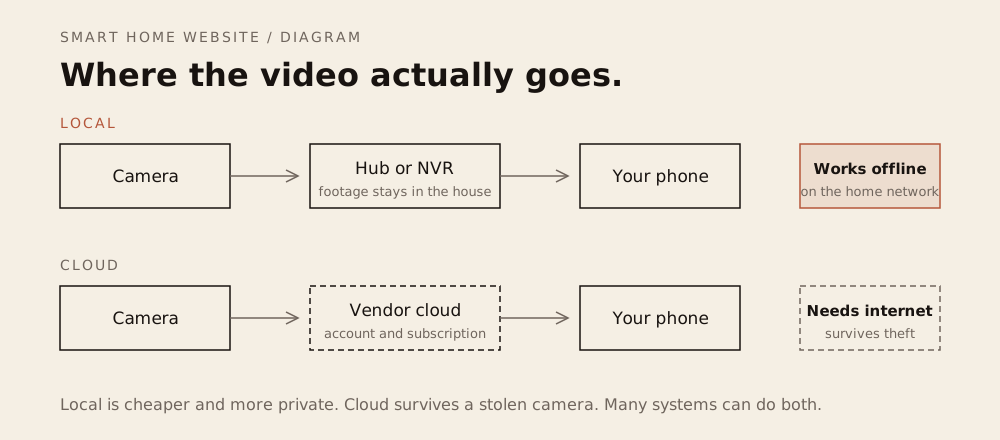
Local video storage keeps camera footage on a card, hub or NVR you own instead of a vendor cloud. It removes the subscription, keeps recording through an outage, and gives you control over retention, access and deletion, and stops a subscription deciding what you keep.
It is one of the most common, frustrating bait-and-switch experiences in modern consumer electronics.
You purchase a handsome video doorbell or outdoor security camera on sale for sixty dollars. You spend a pleasant Saturday morning mounting the bracket to your front porch, connect it to your home Wi-Fi, and for several weeks, the experience feels genuinely magical. Your smartphone chimes whenever a delivery arrives, and you can easily scroll back through a timeline of crisp, recorded video clips showing your family coming and going.
Then, morning number thirty-one arrives. A small, polite banner appears across the top of your screen: “Your complimentary 30-day cloud trial has expired.”
Almost overnight, your capable security hardware is functionally hobbled.
You can still open the app to watch a live video stream, but the moment you want to review who backed into your mailbox, see who swiped a package off your porch, or check what triggered a motion sensor at 2 AM, the app slams a digital door in your face. To view past footage, the manufacturer demands an ongoing subscription fee of five to fifteen dollars every single month.
The math adds up quickly. Paying ten dollars a month across a few cameras quietly siphons six hundred dollars from your household budget over five years—dwarfing the original price of the hardware. Worse, you are effectively paying rent to store your family’s most intimate daily rhythms on someone else’s remote server farm.
Fortunately, there is a grounded, subscription-free alternative: local video storage.
You do not need to pay a perpetual digital tax to protect your property. By keeping your video files stored on physical hardware inside your own four walls, you can enjoy rich, instant recorded history, total data privacy, and zero ongoing fees for as long as you live in your home.
Prices in this article are typical U.S. retail, checked October 2026.
Section 2: Where should your footage sleep, in a safe or a warehouse?
When a security camera detects movement on your porch, it captures an image sensor feed and compresses it into a digital video file. The fundamental privacy question of home security comes down to a simple geographic reality: where does that file actually sleep at night? Where the detection happens is a separate question, covered in Local AI vs Cloud.
To understand the practical and privacy trade-offs, picture how you might choose to store your family’s most private photo albums:
The Commercial Storage Warehouse (Cloud Storage)
Renting cloud storage is like paying for a storage locker at a massive commercial warehouse downtown.
- The Perk: Undeniable convenience. You don’t have to worry about buying storage drives, and you can view your belongings from anywhere in the world through a smartphone screen.
- The Catch: The warehouse management holds a master key. They decide the monthly rental rates, and they can raise prices whenever they choose.
- The Privacy Reality: In recent years, major consumer cloud camera companies have adjusted their privacy terms, used customer clips to train artificial intelligence models, and, in documented instances, handed customer video footage over to law enforcement agencies without a warrant or homeowner consent. When your footage lives in someone else’s warehouse, you play by their rules.
The Fireproof Home Safe (Local Storage)
By contrast, choosing local video storage is like keeping your private records inside a heavy, fireproof safe in your own home.
You hold the physical key. The files live on physical hardware resting inside your living room or bolted to your walls. No corporate entity can audit your footage, no advertising algorithm can analyze your family’s daily habits, and no manufacturer can hold your past recordings hostage behind a surprise paywall.
Why Camera Footage Demands a Safe
A security camera feed is fundamentally different from other smart home data.
A smart plug merely logs that a lamp turned on; a camera records your children playing in the yard, intimate conversations on your front porch, and the exact physical layout of your private sanctuary.
This level of intimate domestic life does not belong in a shared corporate warehouse downtown. It belongs securely locked inside your own four walls.
Section 3: Which of the three local storage options fits your home?
Choosing a local video system does not require setting up a corporate server rack in your garage. Modern hardware provides three distinct tiers of local storage, ranging from a simple fifteen-dollar memory card to industrial-grade recording boxes.
Here is how each system functions in real life, along with its specific trade-offs:
3.1 MicroSD Cards: The Pocket-Sized Starting Point
The simplest and most affordable path to subscription-free video is the humble microSD card—a fingernail-sized piece of flash memory that slides directly into a weather-sealed rubber slot on the camera’s body.
- Where It Shines: Pure simplicity and rock-bottom cost. A high-capacity card costs between $15 and $20. You simply slide the card into the slot, tap “Format” in your smartphone app, and your camera begins recording immediately. There are no extra hardware boxes taking up shelf space in your home, and no complex network configurations. Even better, because the storage lives directly inside the camera, the device will continue recording motion events locally even if your home Wi-Fi crashes or a storm takes down your internet connection.
- The Real-World Trade-Offs:
- The Physical Theft Risk: This is the primary vulnerability of on-device storage. If an intruder approaches your porch, reaches up, rips the camera off the wall, and runs away, they take the memory card—and your recorded evidence—along with them.
- The “Endurance” Trap: Many beginners make the mistake of buying cheap memory cards designed for digital cameras or smartphones. Security cameras write and rewrite video data continuously, which will burn out a standard memory card in a few months. When buying a card, you must choose one explicitly labeled “High Endurance” (from reputable brands like SanDisk, Samsung, or Kingston), which are engineered with industrial-grade memory designed to withstand years of continuous video overwriting.
- The Ideal Placement: Indoor living spaces (monitoring pets or nurseries) and outdoor cameras mounted safely out of arm’s reach, such as high on second-story roof soffits or gutters.
3.2 Local Hubs & Base Stations: The Bookshelf Fortress
A local hub or base station (such as a Eufy HomeBase, TP-Link Tapo Smart Hub, or Reolink Home Hub) represents the sweet spot between plug-and-play simplicity and genuine physical security.
- Where It Shines: With this architecture, your cameras remain wireless on the outside of your house, but they do not store their recordings on the camera itself. Instead, the moment a camera detects motion, it beams the encrypted video files over a private wireless connection to a compact, palm-sized hub hidden safely inside your home—resting on a living room bookshelf or tucked into a closet. If an intruder smashes or steals your front porch camera, your footage remains safely preserved on the hard drive sitting inside your house.
- Smart Local Processing: These indoor hubs do more than store files; they contain dedicated microprocessors that handle artificial intelligence tasks locally. The hub can differentiate between a passing car, a neighbor’s dog, and a delivery driver directly on its internal chip—giving you rich, accurate alerts without beaming your footage to an outside corporate cloud.
- The Real-World Trade-Offs: Brand lock-in. A Eufy base station will only communicate with Eufy cameras, and a Tapo hub only manages Tapo accessories. When you choose a hub, you are committing to that manufacturer’s camera ecosystem.
- The Ideal Placement: Ground-level entryways, video doorbells, back patios, and suburban driveways where outdoor cameras are within physical reach of a passerby.
3.3 Network Video Recorders (NVRs): The 24/7 Professional Standard
A Network Video Recorder (NVR) is the gold standard of residential security.
Think of an NVR as a quiet, dedicated appliance—similar in size to a cable set-top box—housing a heavy-duty, multi-terabyte mechanical hard drive. It connects to multiple cameras positioned around your property, operating as an unyielding, closed-circuit security hub.
- Where It Shines:
- True Continuous 24/7 Recording: Battery-powered and cloud-dependent cameras only wake up when an infrared sensor detects movement. In the real world, this means they frequently miss the crucial five seconds before an incident occurs, or fail to record a car speeding down your street. An NVR never sleeps; it captures every single second of every single day across all cameras simultaneously, allowing you to scrub backward through continuous time.
- Power over Ethernet (PoE): Most modern NVRs connect using PoE. A single, slim network cable plugs into the back of each camera, delivering both continuous low-voltage electrical power and crystal-clear digital video over the same wire. There are zero batteries to recharge, zero solar panels to clean, and zero wireless interference issues.
- The Real-World Trade-Offs: Physical installation effort. Running network cables through an attic, basement crawlspace, or exterior siding requires basic DIY confidence or the help of a local handyman. The initial upfront equipment cost is also higher, typically running between $250 and $450 for an NVR bundled with four high-definition cameras.
- The Ideal Placement: Homeowners seeking commercial-grade perimeter defense that lasts a decade without routine maintenance, battery swaps, or cloud reliance.
Section 4: Can you still watch your cameras remotely without a cloud plan?
The single most common question beginners ask when considering local storage is simple:
“If all my camera footage is sitting on a small hard drive in my living room, does that mean I won’t be able to check my cameras when I am away on vacation?”
The answer is an emphatic no.
Beginners often assume that in order to view cameras on a smartphone outside the house, you must pay for a cloud subscription. In reality, you are conflating where your footage is stored with how your phone streams it. You can easily check live camera feeds and review past clips from a hotel room across the globe without paying a single dollar in monthly fees.
The Digital Matchmaker (Peer-to-Peer Encryption)
Most modern local camera systems (such as Reolink, TP-Link Tapo, and Eufy) solve remote access using what engineers call Peer-to-Peer (P2P) encrypted connections.
Think of the camera company’s server like a helpful matchmaker:
- When you open your camera app on cellular data or hotel Wi-Fi, your phone pings the manufacturer’s server.
- The server locates your in-home hub or memory card and securely introduces the two devices.
- Once the connection is established, an encrypted digital tunnel opens directly between your phone and your home, and the matchmaker immediately steps out of the way.
Your video footage streams straight from your living room hardware to your phone screen. The manufacturer never hosts, records, or views your video files on their servers. Because the company does not have to pay for massive server warehouses to hold your footage, they don’t charge you a monthly cloud fee. Local storage keeps the footage in your house, but the camera is still a device on your network, so network security is the other half of keeping it private.
The Apple Alternative: HomeKit Secure Video (HKSV)
If your household runs on Apple devices, you have access to a uniquely private hybrid model called HomeKit Secure Video.
Instead of sending raw camera video to a corporate server for analysis, compatible cameras stream their feeds directly to your local Apple TV or HomePod hub inside your house.
The Apple silicon inside your hub analyzes the footage locally—identifying family members, vehicles, and delivery packages. The hub then encrypts the video clip using a private cryptographic key stored strictly on your personal Apple devices before uploading an encrypted backup to your standard iCloud storage. Even if someone intercepted the file in the cloud, neither Apple nor an outside attacker could view it without your physical iPhone.
Section 5: Which storage method matches your space and your DIY comfort?
Choosing the right local storage foundation comes down to matching your physical living space with your DIY comfort level. Every option in this ledger permanently eliminates recurring cloud fees; your choice simply depends on how much hardware you want to install and where your cameras are physically mounted.
If you rent an apartment or live in a condo, start with On-Device MicroSD Cards. If you own a home with a ground-floor porch and a video doorbell, choose a Local Wireless Hub. If you want permanent, commercial-grade perimeter security that records every single second of the week without ever touching a battery, invest in a Dedicated NVR.
The Local Video Storage Decision Ledger
| Storage Method | Upfront Hardware Cost | Installation Complexity | Physical Theft Vulnerability | Ongoing Subscription Fees | The Beginner Verdict |
|---|---|---|---|---|---|
| On-Device MicroSD Card (High-Endurance flash) |
Very Low $15 to $25 per memory card. |
Low Slide the card into the camera’s slot and format in the mobile app. |
High If a thief steals or destroys the camera, the memory card and evidence vanish with it. |
$0 / month Completely subscription-free forever. |
Best for Renters & Indoors The ultimate low-cost entry point for indoor nursery and pet cameras, or outdoor cameras mounted high out of reach under second-story gutters. |
| Local Wireless Hub (Eufy HomeBase, Tapo Hub, Reolink Hub) |
Moderate $120 to $220 (typically bundled with 1–2 cameras). |
Low to Medium Place the hub on a living room shelf; mount wireless battery cameras outside. |
Zero Footage is beamed wirelessly and stored on the encrypted drive inside your house. |
$0 / month Completely subscription-free forever. |
The Beginner Sweet Spot The best all-round balance for front porch doorbells, back patios, and suburban yards where cameras sit within physical reach of passersby. |
| Dedicated NVR System (Power over Ethernet / PoE) |
Moderate to High $250 to $450 for a multi-terabyte recorder and 4 wired cameras. |
High Requires running physical Ethernet cables through an attic, crawlspace, or exterior walls. |
Zero Footage is recorded to an internal hard drive inside a locked office or utility room. |
$0 / month Completely subscription-free forever. |
The Professional Standard The undisputed champion for permanent homeowners seeking continuous 24/7 video recording, zero battery maintenance, and decade-long durability. |
For a nursery-specific version of the microSD trade-off, see baby monitors without a subscription.
Section 6: How do you start locally with one camera and one card? (Conclusion)
You do not need to drill through exterior brick walls or pull complex cables through your attic to escape the cloud subscription trap.
Instead, start simple with the Porch-to-Bookshelf Blueprint:
Pick just one high-impact location—such as an indoor camera watching your main living space, or a video doorbell guarding your front porch. Pair that camera with a High-Endurance microSD card or a compact wireless base station resting on your living room bookshelf.
Mount the hardware, pair it with your smartphone, and experience the immediate, quiet satisfaction of instant video playback—completely free of monthly bills, surprise price hikes, and corporate oversight.
True home security was never meant to be an ongoing subscription model, nor should it turn your family’s domestic rhythms into corporate training data.
When your security footage lives on physical hardware safely inside your four walls, your home remains exactly what it was always intended to be: a sovereign, private sanctuary that protects your family’s peace of mind, and no one else’s.
Where to buy
Opens an Amazon search. As an Amazon Associate, we earn from qualifying purchases. No product in this guide was supplied or tested by a manufacturer.
Related reading
- The Smart Home Privacy Audit — a weekend pass over accounts, cameras and data.
- The Smart Perimeter — layered outdoor security without the fortress myth.
- Smart Locks 101 — retrofit locks that keep the physical keyhole.
- The Smart Home Maintenance Guide — the upkeep tasks that prevent most failures.
Sources
- Privacy — Electronic Frontier Foundation
- Privacy Not Included — Mozilla Foundation
- Cybersecurity advisories — CISA
- Physical security — CISA