Matter and Thread 101: The Standards, Explained

Matter is not a radio and Thread is not an app. Here's what each standard actually does, how they fit together, and what still goes wrong in a real home.
Section 1: What is the difference between Matter and Thread? (Introduction)
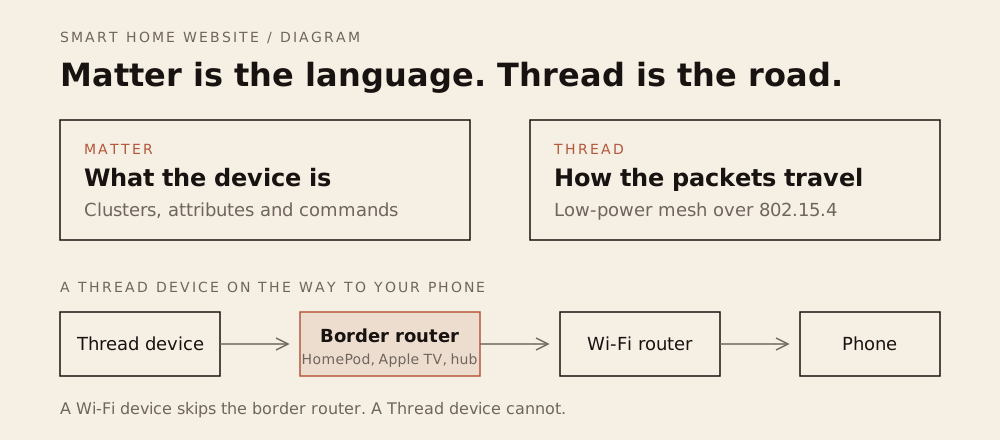
Matter is the language; Thread is the radio. Matter lets a device work across Apple, Google, Alexa and Home Assistant; Thread is a low-power mesh that needs a border router. You can have one without the other, and most buyers need both.
Matter and Thread get mentioned together so often that they sound like one thing. They are not. Matter is a language devices speak; Thread is one of the roads they speak it over. A Matter bulb can run on Wi-Fi or Thread, and a Thread device does not have to speak Matter at all. For a buying shortlist, see Best Matter Devices.
That distinction matters because it decides what you need to buy. If you buy a Matter-over-Thread sensor, you need a Thread border router and a Matter controller. If you buy a Matter-over-Wi-Fi plug, you need only the controller. If you buy a Zigbee sensor, you need a Zigbee hub, and Matter may or may not enter the picture through a bridge.
Matter launched in October 2022 and has added device types with each revision; by 2026 the specification is at version 1.6, with cameras and more complex devices arriving in recent releases. The confusion is expensive: it sells border routers to people who needed a hub, and hubs to people who needed neither. The standards exist to solve a real problem: a house full of devices that only talk to their own app. Matter is the interoperability layer, Thread is a low-power network for the devices that cannot justify a Wi-Fi radio, and the two are designed to work together without making you learn a protocol. This guide explains what each one is, what it is not, how they fit, and where the compatibility story still breaks. For the wider picture, start with the Foundations hub.
Section 2: What is Matter, and what is it not?
Matter is an application-layer standard created by the Connectivity Standards Alliance, the same body behind Zigbee. It defines how devices are discovered, commissioned, controlled, and shared across ecosystems, and it runs over IP — which is why Matter can work on Wi-Fi, Ethernet, or Thread without changing the application layer.
The CSA’s own description emphasizes three things: interoperability (devices from multiple brands work together), reliability (“consistent and responsive local connectivity”), and security through certification. Those are the promises.
What Matter is not
- A radio. There is no “Matter band.” Matter runs on top of Wi-Fi, Ethernet, or Thread.
- A guarantee of every feature. A Matter device supports a defined set of capabilities. Energy reporting, adaptive lighting, and special effects are not universal, and a feature that exists in the manufacturer’s app may not appear in Apple Home or Google Home.
- A cloud service. Matter is designed for local control, but remote access still depends on the platform’s hub or cloud.
- A security guarantee. Certification requires secure commissioning and encrypted communication, but it does not control what the manufacturer’s app does with your data afterward.
- A replacement for Zigbee or Z-Wave. Those are separate protocols. Matter can reach them through a bridge, not by magic.
Multi-admin
Device types and versions
Matter started with lights, plugs, switches, sensors, locks, thermostats, and window coverings. Later revisions added appliances, cameras, and more complex device classes. The practical lesson is that “Matter-certified” is a floor, not a ceiling, and the logo does not tell you which platform version supports the device type: a certified device supports the device type it claims, but the platform may not support that type yet, and the manufacturer may keep extra features in its own app.
The most useful Matter feature is multi-admin: commission a device once, then share it with another ecosystem. In practice, you add the device to one app, generate a pairing code, and add it to the second. It works, but it is a setup step, not a default, and not every device exposes it cleanly.
Section 3: What is Thread, and what is it not?
Thread is a low-power, low-latency wireless mesh built on IPv6. It is designed for battery-powered devices that need to stay connected for years: sensors, locks, blinds, and buttons. The Thread Group describes a network with “no single point of failure” that can self-heal, with devices routing through one another.
The border router
Mains-powered Thread devices — plugs, bulbs, and some sensors — also act as routers and strengthen the mesh; battery devices are endpoints. That is why a Thread network gets more reliable as you add powered devices, not less. A Thread network cannot reach the internet on its own. It needs a Thread border router, a device that bridges the Thread mesh to your IP network. Apple’s support documentation is explicit: a Thread accessory requires a border router, and if you do not have one, setup stops with a “Thread Border Router Required” alert.
| Wi-Fi | Thread | Zigbee | |
|---|---|---|---|
| Power | Mains, hungry | Battery, years | Battery, years |
| Bandwidth | High | Low | Low |
| Needs | Router | Border router | Hub |
| Best for | Cameras, plugs | Sensors, locks, buttons | Sensors, bulbs |
Common border routers include the HomePod mini, Apple TV 4K, Nest Hub (2nd gen), Echo (4th gen), and some eero models. A Home Assistant server can act as one with a Thread radio attached. The border router is the piece people forget to buy, and it is the reason a Thread sensor can fail to set up in a house that already has Wi-Fi. Put it centrally, not in a back closet.
What Thread is not
- A hub. The border router routes packets; it does not run your automations. The Matter controller does that.
- Wi-Fi replacement. Thread is low-bandwidth by design. It is for sensors and controls, not cameras.
- Plug and play across brands. Thread networks have credentials, and joining a device to a second ecosystem can require sharing the network key or re-commissioning.
Section 4: How do Matter and Thread fit together?
The clean mental model has three layers:
| Layer | What it does | Examples |
|---|---|---|
| Device | The sensor, bulb, lock or plug | A Matter-over-Thread sensor |
| Network | How the device reaches IP | Wi-Fi, Ethernet, or Thread plus a border router |
| Controller | The app and hub that run automations | Apple Home, Google Home, Alexa, SmartThings, Home Assistant |
The controller is the app plus the hub that runs automations. Without it, the devices are islands: they can be controlled one at a time, but nothing coordinates them. A Matter-over-Thread device needs the bottom two: a border router for the network and a controller for the logic. A Matter-over-Wi-Fi device needs only the controller. A Zigbee device needs a Zigbee hub, which may expose it to Matter through a bridge.
Commissioning, step by step
- Open the controller app (Apple Home, Google Home, Alexa, SmartThings, or Home Assistant).
- Choose Add Accessory and scan the Matter QR code or enter the pairing code.
- For a Thread device, confirm the border router is on the same network and in range.
- Name the device and assign it to a room.
- To share it, open the device settings, choose Share or Add to another ecosystem, and generate a new pairing code.
- Add that code in the second app.
The last two steps are where multi-admin lives. If the second app cannot find the device, the first app may not have generated a valid share code, or the second ecosystem may not support that device type yet.
Google’s Matter setup guidance makes the same point in practical terms: a compatible hub is required, and for Thread devices the hub must have a Thread border router. The setup app will tell you which piece is missing, usually by name.
Bridges
A bridge translates a non-Matter protocol into Matter. Philips Hue’s Bridge is the best-known example: the bulbs stay Zigbee, and the Bridge exposes them to Matter ecosystems. The bridge is useful, and it is also a single point of failure and a vendor dependency. Treat it as a translator, not a cure.
Section 5: What still goes wrong after setup?
The standards are real, and the experience is not seamless yet. These are the failures to expect.
The device will not commission. Check the border router first, then IPv6, then distance. A Thread device at the far end of the house may be out of mesh range even though the Wi-Fi is fine.
The device joins but shows fewer controls. That is usually feature parity, not a fault: the platform supports the device type but not every attribute. Check the platform’s supported device list before assuming a return is needed.
Feature parity. A Matter device exposes a subset of its capabilities. The manufacturer’s app may show energy data, effects, or custom settings that the Matter controller does not. Check the platform’s supported device types before buying for a specific feature.
Multi-admin friction. Sharing a device between Apple Home and Google Home works, but the second ecosystem may not expose every control, and removing the device from one does not always clean up the other.
Thread credentials. Thread networks have keys. Moving a device between ecosystems may require sharing the network key, and some platforms handle that better than others. A device that refuses to join is often a credential problem, not a hardware failure.
IPv6. Matter and Thread are IP-based, and a router that does not handle IPv6 properly can break setup in ways that look like device faults. If a Matter device will not commission, check the router’s IPv6 settings before returning it.
Bridges are still bridges. A Hue bulb behind a Bridge is still a Zigbee bulb. If the Bridge goes offline, Matter does not save it.
Cameras and other complex devices. Matter added camera support in a recent revision, but platform support is uneven and the features exposed are a subset of what the manufacturer’s app offers. A camera is still a camera with a cloud, an app, and a subscription; Matter does not change that. A camera is still a camera with a cloud, an app, and a subscription; Matter does not change that.
Section 6: What three questions should you ask before you buy? (Conclusion)
- What radio does it use? Wi-Fi, Thread, Zigbee, or Z-Wave. That tells you what infrastructure the device needs.
- Do I already own the missing piece? A Thread border router, a Matter controller, or a Zigbee hub. If not, add its cost to the purchase.
- Does the feature I want survive the trip? Check the platform’s supported capabilities, not just the Matter logo. Energy reporting, adaptive lighting, and camera features are the usual casualties.
Add the cost of the missing infrastructure before you compare prices. A $30 Thread sensor that requires a $99 border router is a $129 sensor, and a $20 Zigbee sensor that needs a $60 hub is an $80 sensor. The sticker is not the system.
Buy the controller you will actually use, then the devices it supports. The ecosystem is the long-lived decision; the standards are the compatibility layer that makes changing it less painful.
Check the firmware and the platform’s supported-device list before buying, not after the return window. Some homes should ignore the standards entirely. If you are happy in one ecosystem and the devices you want are certified for it, Matter buys you portability you may never use. If you are building a mixed house, or you want to move devices between Apple, Google, and Home Assistant over time, Matter and Thread are the reason the second purchase is easier than the first.
The standards are not a brand, a hub, or a promise that everything works. They are a common language and a low-power road. Buy the road you need, and check that the device speaks the language before you plug it in. If pairing fails, the commissioning checklist starts with IPv6 and the border router.
Where to buy
Thread border routers on Amazon
Opens an Amazon search. As an Amazon Associate, we earn from qualifying purchases. No product in this guide was supplied or tested by a manufacturer.
Related reading
- Choosing a Smart Home Ecosystem — the platform decision underneath the standards.
- The Smart Hub Blueprint — where the controller and border router live.
- Smart Plugs 101 — Matter, Wi-Fi and Thread in a $10 device.
- Smart Bulbs 101 — Zigbee, Thread and Matter in lighting.
Sources
- Build With Matter — Connectivity Standards Alliance, IP foundation, interoperability and local connectivity checked October 2026
- Thread Benefits — Thread Group, IPv6 mesh, self-healing and no single point of failure checked October 2026
- If you see a ‘Thread Border Router Required’ alert — Apple, Thread border router requirement and home hub checked October 2026
- Prepare your smart home for Matter — Google Home Help, Matter hub and Thread network requirements checked October 2026