The Smart Hub Blueprint: Do You Need a Local Server?

Confused by smart home brains? A beginner-friendly look at plug-and-play consumer hubs versus dedicated local servers like Home Assistant.
| Model | Power | Protocol | Hub | Subscription | Local control |
|---|---|---|---|---|---|
| Home Assistant Green | Plug-in | Ethernet | Is the hub | No | Local |
| Apple TV 4K | Plug-in | Ethernet + Wi-Fi | Is the hub | Optional iCloud | Hybrid |
| Amazon Echo (4th gen) | Plug-in | Wi-Fi | Is the hub | Optional | Cloud |
Local keeps working without the vendor cloud. Hybrid controls locally but uses the cloud for remote access. Cloud needs an account and internet for remote use.
Section 1: Do you need a local hub, or is a speaker enough? (Introduction)
A local hub is worth it if you want automations that survive an outage and devices from several brands in one app. Home Assistant is the deep option; Apple, Google and Alexa hubs are simpler but more limited in what they expose.
You bring home an in-wall smart switch, a couple of smart plugs, and a smart deadbolt. You pair each one to its manufacturer’s smartphone app, and for an afternoon, tapping virtual buttons feels exciting.
Then, you attempt to make them cooperate.
You want your arrival to feel seamless: the front deadbolt unlocks, the entryway lamp glows softly, and the hallway thermostat eases up two degrees. Suddenly, you hit a frustrating standstill. Your devices are stranded on separate digital islands, speaking completely different languages, with no way to communicate with one another.
To bridge that gap, your home needs a coordinator—an invisible central brain.
When you turn to the internet for guidance on choosing a command center, you are immediately thrown into an intimidating ideological tug-of-war:
- Enthusiast forums insist that if you aren’t buying a refurbished enterprise mini-computer, installing specialized open-source software, and learning command-line code, you aren’t building a “real” smart home.
- Meanwhile, the clerk at the electronics store points to a shelf of twenty-dollar smart speakers and promises that plugging in a plastic microphone is all you will ever need.
Let’s clear away the technical gatekeeping: a server is not a massive, humming cabinet wrapped in flashing lights and tangled cables. In home automation, a server is simply a small, quiet, low-power computer that stays awake twenty-four hours a day so your home can listen, think, and react locally.
The real question is not whether you can assemble an elaborate server in your utility closet—it is whether your household actually needs one.
In this guide, we break down the architectural divide between plug-and-play consumer hubs and dedicated local hardware. You will discover the honest trade-offs of both paths, evaluate your family’s technical appetite, and choose the command center that delivers effortless comfort without turning into an exhausting second job.
Prices in this article are typical U.S. retail, checked October 2026.
Section 2: Which hub is already in your living room?
Before you spend a single dollar on specialized hardware, take a close look around your living room. There is a strong chance you already have a capable smart hub plugged into your wall without even knowing it.
If you own an Apple TV 4K connected to your television, an Amazon Echo (4th Gen) on your kitchen counter, or a Google Nest Hub on your bedside table, you already possess an active smart home command center.
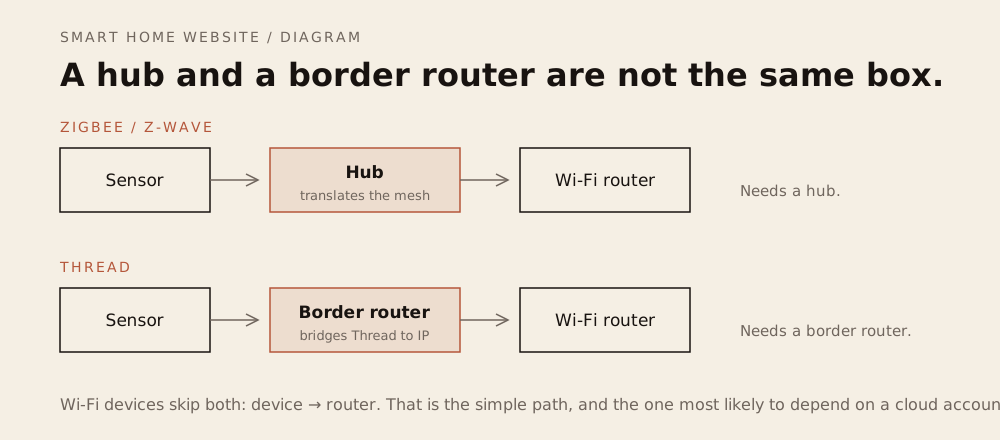
Modern streaming boxes and smart speakers are not just entertainment gadgets; they contain dedicated low-power radio transmitters. An Apple TV 4K or HomePod mini doubles as a Thread Border Router—an internal bridge that allows modern, battery-sipping Thread sensors to communicate directly with your home network without buying extra plastic adapters.
Similarly, an Echo (4th Gen) includes an internal Zigbee coordinator, allowing compatible smart bulbs and motion sensors to pair straight to the speaker with zero setup fuss.
The Real-World Strengths
For the vast majority of households, these plug-and-play consumer hubs represent the path of least resistance:
- Zero Administrative Overhead: You never have to configure network firewall ports, manage computer storage, or read through technical software release notes. Updates occur quietly in the background while you sleep, and system controls are baked natively into the phone interface you already use every day.
- The Zero-Friction Family Factor: Your partner, children, and visiting relatives already understand how to speak to Siri, Alexa, or Google Assistant. There is no obscure new mobile app to download, no complicated dashboard layout to teach, and zero domestic pushback from family members who just want the living room reading lamp to turn on.
The Structural Limits
However, choosing a mainstream consumer hub means accepting real architectural trade-offs that product marketing pages rarely mention:
- The Walled Garden Barrier: Mainstream tech giants design their hardware to lock you into their broader ecosystem. If one partner carries an iPhone and the other carries an Android device, Apple Home is an instant non-starter. Meanwhile, Amazon’s Echo Show displays also surface promotional content alongside your devices.
- The Shallow Automation Ceiling: Consumer apps handle basic cause-and-effect routines admirably (“When a door opens at 6 PM, turn on the hallway light”). However, they hit a hard wall when real life demands nuanced conditional logic. If you want to build an automation that says: “Only turn on the accent lights IF motion is detected, AND the television is off, AND the bedroom door is cracked open,” consumer interfaces will leave you stranded.
- The Lingering Cloud Tether: While Apple Home processes most basic commands locally across your home network, Google and Amazon remain heavily dependent on cloud services. When your neighborhood internet connection drops, smart speakers lose their ability to understand voice commands, complex routines stall, and your home temporarily loses its mind.
Section 3: When is a dedicated local server worth it?
If mainstream consumer hubs represent the welcoming front porch of home automation, the enthusiast path revolves around setting up an independent, dedicated local server—most famously anchored by the open-source platform Home Assistant.
For years, stepping into this world felt like a technical initiation ritual. You had to purchase a bare green circuit board (such as a Raspberry Pi), source tiny heatsinks and a plastic case, flash software onto memory cards, and write text commands in terminal windows.
Today, that barrier has dissolved thanks to the turnkey hardware revolution.
Modern dedicated hubs—most notably the Home Assistant Green (a clean, palm-sized appliance costing roughly two hundred dollars)—arrive ready to use. You simply plug an Ethernet cable from the hub into your home router, connect the power adapter, and open an app on your smartphone. It delivers the muscle of a dedicated computer server packaged with the physical simplicity of a streaming box.
The Sovereign Superpowers
Why do so many homeowners graduate from consumer hubs to a dedicated local server? Because doing so unlocks three foundational superpowers that commercial tech giants refuse to provide:
- Absolute Digital Sovereignty: The server is physically yours. It runs 100% locally on a processor sitting in your living room or utility closet. Your device data stays on hardware you own, no corporate advertising engine tracks your sleep schedule, and your automations execute in milliseconds—functioning identically whether your internet connection is blazing or completely severed by a winter storm.
- Limitless Interoperability: A dedicated local server shatters corporate walled gardens. With an integration library that covers most major brands, it connects hardware that competing brands deliberately isolate. It seamlessly bridges your Apple devices, your Google Nest thermostat, your vintage Zigbee bulbs, your budget robot vacuum, and your local security cameras into a single, unified control screen.
- No Automation Ceiling: You are permanently freed from simplistic cause-and-effect rules. You can build deeply nuanced, multi-variable domestic logic: “If motion is detected in the kitchen, but ONLY IF the sun is below the horizon, someone is actively sitting on the sofa, and the coffee maker hasn’t brewed yet, ease the under-cabinet lighting on at 25% warm amber.”
The Unvarnished Maintenance Debt
However, complete digital freedom comes with an inescapable real-world cost: ongoing administrative responsibility.
In home automation engineering, this is known as the “Weekend Mechanic Syndrome.” When you choose to own a dedicated local server, you are not merely a resident enjoying a home; you are the building’s chief technology officer:
- The Update Cadence: Independent platforms evolve rapidly, often pushing out major software updates on a monthly schedule. While these updates introduce exciting capabilities, third-party services occasionally alter their digital connections, requiring you to troubleshoot a broken integration or re-authenticate an account.
- Self-Reliant Troubleshooting: If an update glitches or a drive corrupts, there is no corporate 1-800 helpline to call. You are responsible for maintaining regular local backup snapshots so you can roll back your system if something breaks.
- The Customization Rabbit Hole: Because the platform has no boundaries, it is dangerously easy to spend three hours on a sunny Saturday afternoon redesigning dashboard buttons or fine-tuning sensor delays instead of relaxing with your family.
Section 4: Does your household want to run a server?
Deciding between a plug-and-play consumer hub and a dedicated local server is not an engineering contest—it is a lifestyle choice.
The most powerful platform on paper will still become a source of misery if it demands more maintenance time than you are willing to give, or if it causes friction with the people sharing your living space.
Before spending money on new hardware, sit down at your kitchen table and run your household through three honest practical filters:
1. The “Toaster vs. Classic Car” Test
Be realistic about how you want to spend your free time on the weekends:
- The Toaster Mindset: You view home automation the exact same way you view an everyday kitchen toaster. You plug it into the wall, push the lever down, get warm toast, and never spend another second of your life thinking about how the heating coils function. You want a fifteen-minute setup, automatic background updates, and zero ongoing homework. If this sounds like you, embrace a consumer hub like an Apple TV or Google Nest Hub without a shred of guilt.
- The Classic Car Mindset: You treat your living space like a vintage roadster parked in the garage. You find genuine joy in popping the hood, tuning performance, wiring up custom sensor gauges, and designing bespoke wall-tablet dashboards on a rainy Saturday morning. If you find deep satisfaction in creative digital tinkering, an independent local server will be one of the most rewarding purchases you ever make.
2. The Household Tolerance Audit
Technology does not exist in an isolated testing lab; it lives alongside your partner, children, roommates, and houseguests.
Ask yourself: How much patience does my household have for unexpected glitches?
If an experimental software update causes a hallway light to pause for two seconds, or if a morning wake-up routine misfires on a hectic Tuesday, will your family laugh it off—or will domestic frustration quickly boil over into an unplugged hub?
A smart home should remove everyday friction, not introduce household tension. If your family demands appliance-grade, set-and-forget simplicity with zero tolerance for troubleshooting, keeping your foundation commercial and hands-off is the kindest choice you can make.
3. The Pro Hybrid Model (The Best of Both Worlds)
You do not actually have to make an all-or-nothing choice. Experienced home engineers frequently deploy an elegant compromise: the hybrid architecture.
In this model, you separate the invisible engine from the family steering wheel:
- The Engine (Local Server): A dedicated, palm-sized local server (such as a Home Assistant Green) sits quietly in a utility closet or office. It performs all the heavy lifting: uniting incompatible hardware brands, managing local Zigbee and Thread sensors, and executing sophisticated multi-condition logic locally.
- The Steering Wheel (Consumer Front-End): The server then exports those clean, finished switches and sensors upstream into Apple Home or Google Home using simple, built-in digital bridges.
Your family members continue using the familiar, polished smartphone screens and friendly voice assistants they already know and trust. Meanwhile, your local server works quietly behind the scenes—giving you the infinite power of a dedicated server, and your household the peaceful simplicity of a plug-and-play appliance.
Section 5: How do you compare hubs before you commit?
Choosing the central brain of your smart home is not an all-or-nothing technical test. There is no moral superiority in running a custom server in a closet if an everyday streaming box gives your family everything it needs.
Every architecture in this ledger represents a deliberate balance between upfront cost, setup effort, and long-term autonomy.
Use this scannable matrix to evaluate the four primary command center paths against your household’s real-world technical comfort level, budget, and tolerance for weekend maintenance.
The Smart Command Center Decision Ledger
| Hub Architecture Category | Typical Upfront Investment | Configuration & Setup Difficulty | Local Offline Reliability (ISP Outage Immunity) |
Ongoing Maintenance Commitment | Ideal Household Match |
|---|---|---|---|---|---|
| Commercial Smart Speaker (Amazon Echo 4th Gen, Google Nest Hub) |
$40 – $100 | Low Five-minute setup via a standard smartphone app; zero networking knowledge required. |
Low to Moderate Routines and voice commands stall during internet outages due to heavy cloud dependence. |
Zero Automatic background updates; completely hands-off. |
The Casual Household Best for newcomers wanting simple voice controls, hands-free kitchen timers, and a few basic smart plugs without touching settings. |
| Commercial Streaming Hub (Apple TV 4K, Apple HomePod mini) |
$149 – $299 | Low Automatic zero-config pairing directly inside the iOS Home app; no coding or extra software. |
High Executes commands locally across your home Wi-Fi and Thread mesh networks even if internet service drops. |
Zero Managed automatically through standard Apple operating system updates. |
The All-Apple Household The ultimate sweet spot for iPhone users who demand rock-solid local latency, end-to-end privacy, and zero weekend maintenance homework. |
| Turnkey Local Server Appliance (Home Assistant Green) |
$199 (plus optional $49 Connect ZBT-2 radio) |
Medium Plug-and-play Ethernet hardware, but requires learning a browser-based dashboard interface. |
Best-in-Class 100% offline local execution; completely sovereign and immune to outside server deprecation or outages. |
Monthly Upkeep Requires checking monthly software releases, keeping local backups, and occasional integration tuning. |
The Sovereign Tinkerer Homeowners who refuse cloud subscriptions, demand total data privacy, and want limitless multi-brand automation power without assembling raw computer parts. |
| Custom DIY Mini-PC Server (Repurposed Intel NUC, Mini PC, Raspberry Pi) |
$120 – $250+ (hardware plus radio dongles) |
High Requires flashing operating system images onto drives, managing BIOS settings, and assembling hardware components. |
Best-in-Class Industrial-strength local compute power; operates entirely within your four walls. |
High You are the chief systems administrator managing operating system updates, hardware thermals, and drive health. |
The Dedicated Tech Hobbyist Enthusiasts who genuinely enjoy weekend tinkering, local artificial intelligence experiments, and building custom digital infrastructure from scratch. |
Typical US prices or manufacturer MSRP, checked October 2026. Hardware prices change; the DIY range is an estimate for used or budget mini-PCs.
Section 6: Where should you start, and what can you skip? (Conclusion)
There is zero shame in starting simple.
Do not let online enthusiast communities convince you that your setup is inadequate simply because you don’t have a miniature server rack humming in your utility closet. If an Apple TV 4K or an everyday smart speaker quietly illuminates your hallway at dusk, secures your front deadbolt at bedtime, and keeps your household comfortable without demanding five minutes of maintenance all year, you have already built a world-class smart home.
Your living space is meant to be a restorative sanctuary, not an unpaid IT department. The ultimate goal of home automation has never been to amass the most complex hardware stack on the block; it is to gently eliminate the small, invisible frictions of daily life.
Choose the infrastructure that honors your lifestyle, your time budget, and your family’s peace of mind today. If you eventually decide to step onto the enthusiast path with a dedicated local server, let it be because you find genuine joy in the creative craft of tinkering—never because an internet forum told you it was mandatory.
Household reality
A hub is infrastructure. Put it on Ethernet, give it a UPS, and write down the admin password. If the hub is in a closet nobody can reach, the first outage will be a family event.
Where to buy
Research-based picks, checked October 2026. We have not tested these units ourselves.
- Home Assistant Green — Local-first controller: 100% offline automations, plus monthly software upkeep. $199
- Apple TV 4K — Apple Home hub and Thread border router; local execution and almost no maintenance. $149
- Amazon Echo (4th gen) — Cheap voice hub for simple routines; automations depend on Amazon's cloud. $99.99
- Add-on: Home Assistant Connect ZBT-2 — adds Zigbee and Thread radios to a Green or other local server.
As an Amazon Associate, we earn from qualifying purchases. Prices are typical U.S. retail, checked October 2026, and change often. Each link opens an Amazon search for the exact model. No product was supplied or tested by a manufacturer.
Related reading
- Smart Home Ecosystems: How to Choose Your Foundation — Apple Home, Google Home, Alexa and Home Assistant compared.
- The Smart Home Maintenance Guide: Keeping Things Running — the upkeep a local server actually demands.
- The Smart Home Privacy Audit: How to Lock Down Your Data — what your devices send home, and how to stop it.
- The Smart Home Budget Blueprint: Where to Splurge and Save — where a hub fits in a realistic first-year budget.
Sources
- Set up your HomePod, HomePod mini, or Apple TV as a home hub — Apple Support
- Amazon Echo (4th Generation) review — What Hi-Fi?
- Home Assistant Green — Home Assistant
- Home Assistant integrations — Home Assistant